
I spent 80 hours and $2500 setting up OpenClaw so you don't have to
A guide on how to setup OpenClaw

Let me be straight with you.
I tried everything. AWS servers. Remote cloud setups. Wrong API keys. Wrong models. I had eight agents running on Telegram simultaneously with “different brains” and every single one kept forgetting what the others were doing. The context just evaporated. Over and over. I tried Kimi. I tried Opus. I burned through roughly $2500 on Anthropic API tokens alone, and I made every mistake you can possibly make in this space.
What I’m about to show you is the other side of that mess. The lean, clean, actually works setup. So simple that your mum would use it, and I mean that in the best possible way.
If you can copy and paste, you’re already qualified.
1/ What you actually need
The machine - your always-on bot host
Nothing fancy. You need a computer that stays powered on 24/7. Minimum specs are laughably modest: 2GB of RAM, a couple of CPU cores, and 20GB of storage. That’s it.
Got an old laptop collecting dust? That works. Want to splash out on an M4 Mac Mini? you’re looking at $700 depending on where you live, and you don’t need to spend that to get started today.
What I actually did? I bought a VPS. A VPS - Virtual Private Server - is essentially a computer in a data centre that you rent by the month. It runs 24/7, it’s already connected to the internet, you don’t need to plug anything in, and you manage it entirely through your keyboard. No physical machine sitting in your home. No setup beyond logging in.
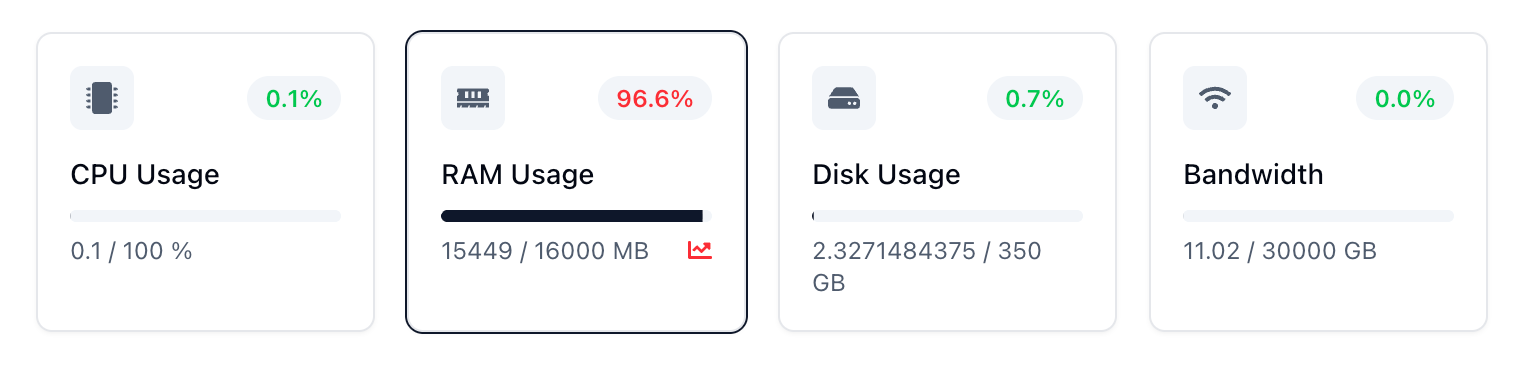
I’m using Contabo for $15 a month. 16GB RAM, enough storage, always on. For the price of a couple of coffees a month, your agent runs around the clock without touching your personal computer.
Old laptop → free.
Mac Mini → $700 once.
VPS → $15/month and running in ten minutes.
Pick what works for you.
2/ The 4 accounts you need
1. Claude Pro - The Brain
Go to claude.ai and sign up. Pro is $20/month, Max is $90/month with significantly more usage. Either works to start, but you’ll hit Pro’s limits faster than you expect once your agent is actually running.
Critical point: you want a Claude membership, not an Anthropic API console account. The console charges per token - every message, every response, it adds up fast. The membership is a flat rate. Way better value. I’ll show you exactly where to find your token during setup.
2. Brave Search - The Eyes (Free)
Without this, your agent is working from static knowledge with no internet access. Sign up at brave.com/search/api, grab your key. Two minutes, done.
3. Gemini 3.1 - The best model today
Google literally just dropped Gemini 3.1 Pro yesterday. It's their most capable model yet - significantly better reasoning, stronger on complex problem-solving, and built for ambitious agentic workflows. It's genuinely impressive. Not part of this core setup, but if you want to experiment with what's possible beyond Claude, this is the one to play with right now.
4. Telegram Bot - The Mouth
This is how you talk to your agent. Free messaging app, dedicated bot you create in two minutes through a tool called BotFather. We’ll walk through it step-by-step during setup.
3/ The actual setup - step by step
Assuming you will go with the VPS way of setting up OpenClaw, since it’s the easiest way you can do right now while you’re reading this article — here’s how it works.
Your VPS is a remote computer you control through your own laptop’s Terminal. To connect, open Terminal on your laptop and type:
ssh root@YOUR_VPS_IPReplace YOUR_VPS_IP with the IP address your VPS provider gave you when you signed up. Hit Enter, type your password when prompted, and you’re in. Everything from here runs inside that connection.
Step 1 - Install Claude and get your token
Run this to install Claude’s command-line tool:
curl -fsSL https://claude.ai/install.sh | bashLog in when prompted. Then close and reopen your SSH connection, and run:
claude setup-tokenCopy the token it shows you into your notes app. Remove any trailing space - that single invisible character breaks everything and costs you an hour of debugging.
Step 2 - Install Node.js
You’re on Linux now, not Mac. Run this instead:
curl -fsSL https://deb.nodesource.com/setup_20.x | bash -
apt-get install -y nodejs
Step 3 - Install OpenClaw
npm install -g openclawStep 4 - Run the onboarding
Type openclaw and hit Enter. Accept the disclaimer, select Quick Start. When asked for a model, choose Anthropic → Anthropic Token. Paste your token. No trailing space.
Navigation: Spacebar to select, Enter to confirm, arrow keys to move.
Step 5 - Connect Telegram
Select Telegram. To get your bot token: open Telegram, search @BotFather, send /newbot, follow the prompts (username must end in “bot”). BotFather hands you a token — paste it into Terminal.
Step 6 - Skills setup
Skip everything except the three hooks at the end — select all three of those. Everything else is noise you can add later.
Step 7 - Hatch it
Select Hatch in TUI. Your bot wakes up. HTTPS error? Trailing space on your token. Fix it, rerun onboarding.
Step 8 - Pair with Telegram
Send your bot something like:
“Your name is [BotName], my name is [YourName]. Here’s my pairing key: [paste key].”
Open your bot on Telegram, enter the pairing key, and it replies there. That’s the moment.
Step 9 - Add Brave and QMD
Just talk to your bot on Telegram:
“Set up Brave Search — here’s my key: [paste]”
“Install the QMD skill.”
QMD is your agent’s long-term memory. Install it now before you start chatting — doing it mid-conversation causes resets and lost history.
4/ Now make It actually yours - this Is the part that matters
Most people skip this section and then wonder why their agent sounds like a generic customer service chatbot. Don’t skip this section.
OpenClaw uses three core files to define who your agent is and what it knows:
SOUL.md — Your agent’s personality. How it talks. What it cares about. Its communication style. Formal or casual? Blunt or warm? Detailed or concise? This file is where that gets defined.
USER.md — Information about you. Your name, your job, your schedule, your preferences, the tools you use daily. The more honest and detailed this is, the more useful your agent becomes.
MEMORY.md — Long-term memory. Your agent updates this file over time as it learns things about you — so it remembers things between conversations, days, and weeks.
You could fill these out manually. But here’s the smarter move: let your agent interview you. Once it’s live on Telegram, send it something like:
“You just came online for the first time. I want you to ask me questions to get to know me — my name, what I do, my goals, how I want you to talk to me, what tools I use daily, what I need help with. Ask them one at a time. Then use my answers to fill out SOUL.md and USER.md.”
It’ll run through 10–15 questions. Answer honestly. Talk about your actual life, your actual work, your actual habits. The more real you are, the better your agent understands you.
Pro tip: reply with voice notes instead of typing. You’ll give more natural, detailed answers, and it’s ten times faster. By the end of this process, your agent has genuine context. It knows who you are. It remembers. This is the difference between a chatbot and something that actually feels like a tool built for you specifically.
4/ Every mistake I made — so you don’t have to
1. You don't need to run Opus 4.6 for everything. It's the most expensive model and should be saved for genuinely complex reasoning tasks. For day-to-day use, Kimi is way cheaper and delivers surprisingly close results. Use Opus 4.6 when you actually need it. Use Kimi for everything else.
2. Running eight agents on Telegram simultaneously. Different brains, different contexts, constantly losing track of each other. One smart agent destroys that every time.
3. Leaving the context files empty for a week. Wondered why my agent sounded robotic and unhelpful. Filled out SOUL.md and USER.md properly. Night-and-day difference - immediately.
4. Installing QMD halfway through. Agent kept resetting and losing chat history mid-conversation. Install it from day one.
5. Ignoring voice messages. I use WhisperFlow, the way I used my agent completely changed. I use it ten times more when I can just talk to it on the go rather than type everything out.
That's genuinely all you need.
From zero to a 24/7 AI agent running on a $15 server - not bad for an afternoon's work. Go have fun with it. And if you want to go deeper, subscribe to my newsletter.
I'm working on something that I think is going to change how anyone builds with agents and you don't want to miss it.